Have you ever wondered if Incognito Mode genuinely safeguards your privacy from those who might be watching, especially your Internet Service Provider (ISP)? You’re not alone in this curiosity. Let’s delve into what happens when you click that iconic hat-and-glasses icon and uncover the truth behind its privacy promises.
What Is Incognito Mode, Really?
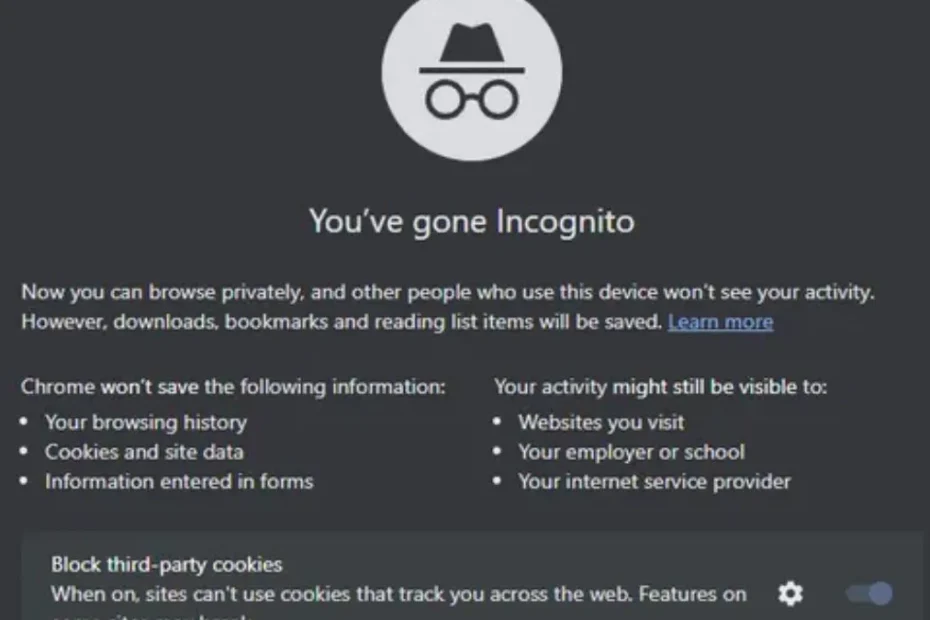
First things first: Incognito Mode (or Private Browsing in some browsers) is designed for privacy, but not the kind you might think. When you open a window in this mode, your browser promises it won’t save your:
- Browsing history
- Cookies
- Site data
- Form inputs
But here’s the catch: just because your computer forgets, doesn’t mean everyone else does. Sounds confusing? Let’s break it down together.

Who Can Still See What You’re Doing?
That incognito window might be spotless when you close it, but what about your ISP? Here’s the reality check:
- Your employer (if you’re on work Wi-Fi) can still see your activity.
- Your ISP logs your traffic, regardless of private mode.
- Websites can track you through your IP address.
No matter what browser you use—Chrome, Firefox, Safari, Edge—the general consensus among privacy experts is clear: Incognito Mode just hides your activity from others using the same device, not from the outside world.
Why Can’t Incognito Mode Fool Your ISP?
Great question. Your connection to the internet travels through your ISP’s servers. Incognito Mode changes nothing about this route. Here’s why:
- ISPs handle the raw internet traffic between your device and the websites you visit.
- They can log which sites you request, when, and sometimes even what you do there.
- Incognito Mode only affects what’s stored locally on your device, not data traveling over the network.
Think of Incognito Mode as erasing your local footprints, not your actual journey.

What About HTTPS? Does That Help?
HTTPS encrypts the content you send and receive, which means your ISP can’t see the exact pages you’re visiting or the data you submit. But—and this is important—they can still see:
- The domains you visit (like google.com, netflix.com, etc.)
- The times you visit those sites
- How much data you transfer
So, while HTTPS is a step up for privacy, it’s not a magic bullet. You’re still leaving clues for your ISP.
Can ISPs Actually Use Your Browsing Data?
In most countries, ISPs can legally track and even sell your browsing data (although some places require your consent). If you’re in the US, for example, ISPs can use your data for advertising unless you opt out. Surprised?
Even if you’re not doing anything shady, it’s a little unsettling to know that someone out there has a record of where you’ve been online.

Want Real Privacy? Here’s What Experts Recommend
If you want to keep your browsing habits private from your ISP, you’ll need to go beyond Incognito Mode. Most privacy pros and organizations suggest:
- Using a VPN (Virtual Private Network): This hides your browsing from your ISP by encrypting your traffic and routing it through a private server.
- Tor Browser: Routes your connection through multiple servers for maximum anonymity.
- Encrypted DNS: Prevents ISPs from seeing the sites you’re requesting via DNS queries.
Each method comes with its own trade-offs in speed, complexity, and cost—but all provide much more real privacy than a simple incognito window.
The Bottom Line
So, does Incognito Mode hide your browsing from your ISP? The answer is a clear—if disappointing—no. It’s great for hiding your activity from friends or family on the same device, but your ISP still sees the big picture.
Looking for true privacy? You’ll need to level up with tools like a VPN or Tor. Until then, that incognito window is more of a helpful myth than a real cloak of invisibility.

VPNs: Do You Really Need One or Is It Just Marketing Hype?

Subscription Fatigue: How to Find and Cancel Subs You Forgot About

5G Conspiracy: Why The Towers Are Harmless (Physics Explained)
Wireless Charging: Is It Less Efficient Than Plugging In?
Screen Protectors: Glass vs Plastic – Which Actually Saves Your Screen?