Have you ever spotted a tiny dot on your screen that just won’t go away? If a stubborn pixel has become a distraction, you might be wondering: is this a sign of monitor trouble, or is there a way to fix it?
Let’s unravel the mystery behind dead and stuck pixels—and see what you (and I) can actually do about them.
What Are Dead and Stuck Pixels, Anyway?
First things first: not all pixel problems are created equal. Most screens have millions of pixels, and sometimes, one or two decide to misbehave.

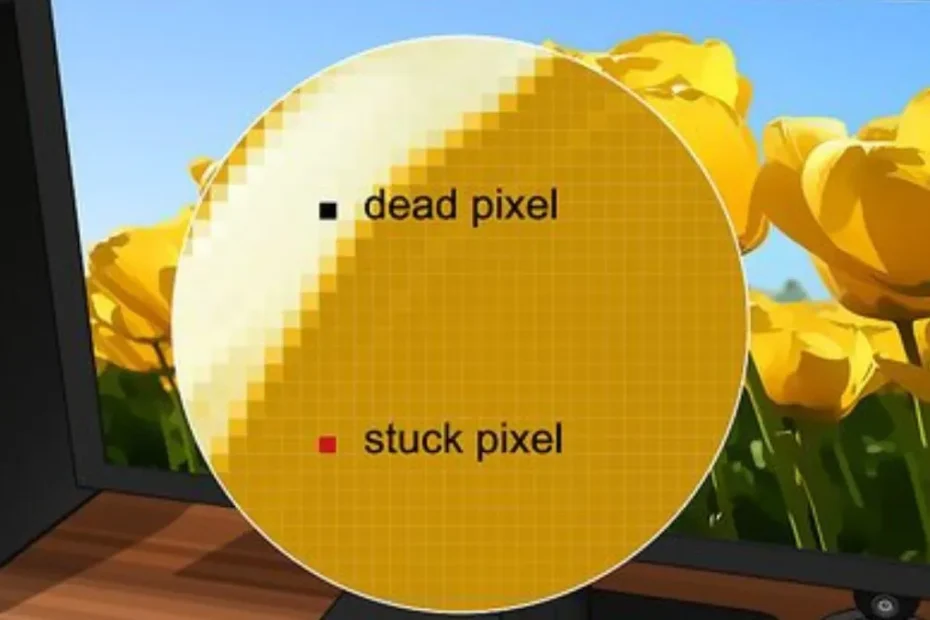
- Dead pixels usually appear black and don’t light up at all.
- Stuck pixels show up as a bright color—often red, green, or blue—and don’t change.
Recognizing which one you’re dealing with is key—because the solutions are different.
How Can You Spot a Stuck or Dead Pixel?
You might not notice a stuck or dead pixel right away, especially if it blends into what you normally see. Here’s a quick way to check:
- Set your monitor’s background to solid white, black, red, green, and blue—one at a time.
- Look for tiny dots that refuse to change color.
Found one? Don’t panic—you’re not alone.
Is a Stuck Pixel Permanent?
This is where it gets interesting. According to consensus among tech experts and major monitor manufacturers, dead pixels (the black, unresponsive ones) are usually permanent. But stuck pixels? Sometimes, they can be revived.
You might have come across various hacks online—some work, some don’t. Let’s talk about what the tech world generally agrees on.
Proven Methods to Fix a Stuck Pixel
Ready for some pixel first-aid? Here are a few reputable approaches you can try:
- Pixel massage: Gently rub the stuck pixel area with a soft cloth (the screen should be off). The idea is to redistribute liquid crystals.
- Software solutions: There are free tools like JScreenFix or UDPixel that rapidly cycle colors to “unstick” the pixel. Run them for 10–30 minutes.
- Power cycling: Sometimes, turning the monitor off and on again (or unplugging it for a few minutes) can help.
I know what you’re thinking: does any of this actually work? For stuck pixels, these methods have helped many users according to forums and manufacturer support pages. It’s always worth a try!
When Should You Give Up?
But here’s the reality—if a pixel is truly dead (black, never lights up), there’s not much you or I can do. Manufacturers usually won’t cover a single dead pixel under warranty, unless there are several.

- If the pixel stays black after multiple attempts, it’s likely gone for good.
- If you’re still under warranty and enough pixels are affected, contact support.
For most people, a single dead pixel is more annoying than damaging. Over time, you might even stop noticing it!
Can You Prevent Stuck or Dead Pixels?
Good question! While there’s no guaranteed method, you can reduce the risks:
- Avoid leaving static images on your screen for too long.
- Handle your monitor gently—don’t press hard on the screen.
- Use a screensaver or let your display sleep when not in use.
These habits can help extend your monitor’s life (and keep those pixels happy).
The Bottom Line
So, can you fix a stuck pixel on your monitor? Sometimes, yes! Dead pixels are usually here to stay, but stuck pixels have a fighting chance—especially if you act quickly. While there’s no magic cure, a mix of patience and the right tools can tip the odds in your favor.
Have you ever managed to rescue a stubborn pixel? If so, you’re ahead of the curve! Next time you spot a suspicious dot, you’ll know exactly what to do—and when it’s time to move on.

VPNs: Do You Really Need One or Is It Just Marketing Hype?

Incognito Mode: Does It Actually Hide Your Browsing from Your ISP?

Subscription Fatigue: How to Find and Cancel Subs You Forgot About

5G Conspiracy: Why The Towers Are Harmless (Physics Explained)
Wireless Charging: Is It Less Efficient Than Plugging In?